Guide · Updated
How to Verify an Exchange's Official Telegram Channel
Four ways to confirm a crypto exchange's or project's real Telegram channel, why regional 'official' groups trip people up, and what to do when you find a fake.
Search Telegram for any big exchange name and you’ll get a list of channels and groups that all look official. Same logo, same colours, “Official” in the name. Usually one or two of them really belong to the exchange. The rest are fan chats at best and support scams at worst.
Here’s how to tell which is which, using the same methods we use for the exchange communities in our directory. This guide is part of our guide to finding good crypto Telegram channels.
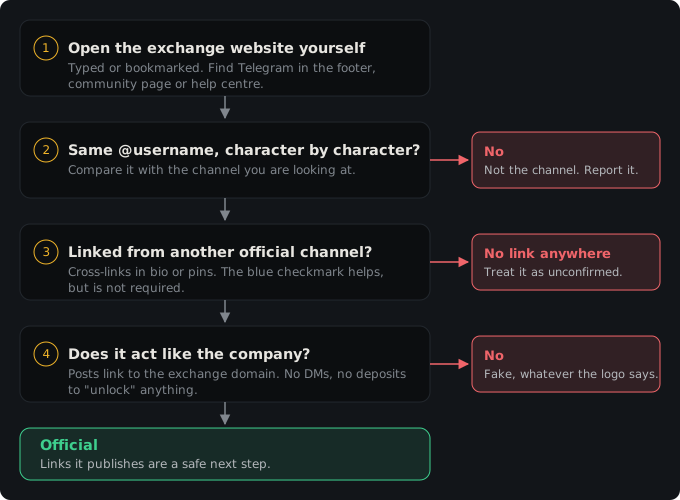
Method 1: start from the exchange’s website
The single most reliable source is the exchange’s own site. Look in three places:
- The footer. Most exchanges show social icons at the bottom of every page, including Telegram.
- A community page. Many exchanges have a page listing every official community by language and region. If an exchange has a Russian, Turkish or Vietnamese chat, this is where it’ll be listed.
- The help centre. Search for “official channels” or “verify”. Several exchanges run a verification tool where you paste a Telegram username, a website or an email and it tells you whether it’s official.
Type the exchange’s address yourself or use a bookmark. Don’t follow a link from a Telegram post, a search ad or an email to find the “official” site, because that’s the step the whole scam depends on.
Once you have the username from the website, compare it character by character with the channel you’re looking at. If they don’t match exactly, it isn’t the channel.
Method 2: follow the cross-links
Official channels point to each other. An exchange’s announcement channel usually links its community chat in the bio or a pinned message, and the chat links back to the announcement channel. Regional channels are often listed in a pinned post in the main English community.
On Binance’s English community, for example, the listing in our directory notes that typing /communities inside the chat brings up the other language communities. OKX’s English community links out to separate announcement, campaign and wallet channels.
If you’ve already confirmed one channel through the website, every link it publishes is a safe next step. A channel nobody official links to is an orphan, and orphans deserve suspicion.
Method 3: Telegram’s blue checkmark
Telegram gives a blue checkmark to verified public figures and organisations, and big exchanges usually have one on their main channels. When it’s there, it confirms the owner.
Three limits:
- Not every official channel has one. Smaller regional chats, secondary channels and newer projects often don’t. A missing checkmark doesn’t make a channel fake.
- Display names can include emoji that look like a checkmark. The real checkmark is part of Telegram’s interface, next to the name in the header and in search results. A ✅ typed into the name is decoration.
- Third-party verification is a separate icon. Since January 2025 Telegram lets approved services add their own verification icon before a chat’s name. Opening the profile shows who verified it and why. It isn’t the blue checkmark, and Telegram’s verification guidelines say only Telegram can assign that one.
In our directory, “checked by us” and “verified badge” are different labels for the same reason: we list plenty of official channels that we tied to the owner by website or cross-link but that don’t carry Telegram’s checkmark.
Method 4: check what the channel actually does
A real exchange channel behaves like a company’s channel:
- Announcement channels post listings, delistings, maintenance windows, product launches and campaigns. Those posts link to the exchange’s own domain.
- Community chats are moderated by admins whose usernames you can check, and they pin warnings like “Admins will never DM you”.
- Nobody in an official channel asks you to send funds to a wallet to “unlock” a withdrawal, “sync” an account, or verify anything.
If a channel calling itself official mostly posts “investment plans”, giveaways that require a deposit, or contact handles for “account managers”, it isn’t official, whatever the logo says.
Why regional channels are where people get caught
The English channels of big exchanges are well known and heavily watched. Regional ones aren’t. A fake “Exchange X Türkiye” or “Exchange X Vietnam Support” is much less likely to be reported quickly, and users searching in their own language often have fewer sources to check against.
Some extra points for regional channels:
- Check the exchange’s list of regional communities. If a country isn’t listed, the exchange may simply not run a channel there.
- Separate local entities exist. Some exchanges run separate local platforms with their own sign-up. Our Turkish page notes that Bybit Türkiye works as a separate platform, so check which one a channel belongs to before you deposit.
- “Unofficial” channels sometimes say so. Read the bio. A channel that calls itself “unofficial” or “community-run” isn’t lying, but it isn’t the exchange either.
- Handles change owners. If an exchange abandons a regional channel and the username is freed, someone else can claim it. That’s one reason we re-check listings and show the date.
The Russian, Turkish and Vietnamese language pages on our site list regional channels we tied to their owners, along with a few we deliberately left out.
Announcement channel vs community chat
Most exchanges run two kinds of Telegram presence:
- An announcement channel, where only the exchange posts. Example: Bybit Announcements, Binance Announcements, OKX Announcements.
- A community group, where users talk and moderators answer. Example: Bybit English.
The announcement channel is the safer place to get information. The community chat is useful for quick questions, but it’s also where impersonators work, because they can see who’s asking for help. If you post “my withdrawal is stuck” in a big exchange chat, expect DMs from fake support within minutes. Real staff will answer in the chat or point you to the exchange’s support ticket system. They won’t DM you first.
The Bybit Telegram groups list shows the split for one exchange in detail.
Found a fake? What to do
- Don’t interact. No replies, no clicking links, no “just checking”.
- Report it in Telegram. Open the channel or account, tap the menu, choose Report, and pick the closest reason (impersonation or scam).
- Tell the exchange. Most have a way to report fake channels through support. They can push Telegram for a removal and sometimes add a “Scam” or “Fake” label.
- Warn the real community, briefly, without reposting the scam link.
Telegram does mark some accounts with “Scam” or “Fake” labels after reports. If you see one of those labels, believe it. If you don’t, that proves nothing.
A 60-second version
- Get the username from the exchange’s website, typed in by you.
- Compare it character by character.
- Check for the real blue checkmark, but don’t require it.
- Confirm the channel is cross-linked from another official channel.
- Ignore anything that DMs you.
For the general checks that work on any channel, not just exchanges, see is this crypto Telegram channel legit?.
Part of our series on crypto Telegram. Start with the overview: How to Find Good Crypto Telegram Channels (and Skip the Junk).