Guide · Updated
A Burner Wallet Setup for Airdrops (So One Bad Link Can't Drain You)
How to set up a burner wallet for airdrops from Telegram channels: separate wallet and browser, small gas balances, reading signatures, revoking approvals.
Airdrop hunting means clicking a lot of links, connecting your wallet to a lot of new apps, and signing a lot of things you’ve never seen before. Most of them are fine. One bad one can empty the wallet you used.
The fix is simple: never do it with the wallet that holds your savings. Use a separate, disposable “burner” wallet, and keep it set up so that the worst case is losing a little gas money. This guide walks through the setup. It’s part of our guide to finding good crypto Telegram channels.
The three-wallet idea
Many people who do this regularly keep three levels:
- Vault. Long-term holdings. Ideally a hardware wallet. Never connected to new or experimental apps. Never used for airdrops.
- Daily wallet. For apps you already trust and use regularly: a big exchange, a well-known DEX.
- Burner. For airdrops, testnets, mints, new mini-apps, anything from a Telegram link. Holds only what you need for gas, and whatever you just received.
Money flows one way: from the burner to the vault, never the other way, except small gas top-ups.
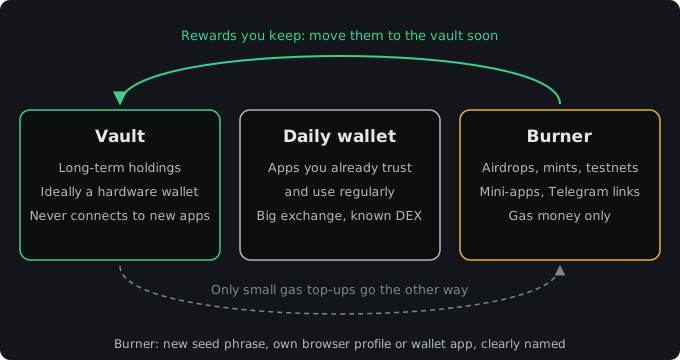
Step 1: create the burner as a new wallet
Create a new wallet with a new seed phrase. Don’t just add another account inside your main wallet app: on many wallets, extra accounts share the same seed, so if that seed is ever exposed, all of them are.
- Write the new seed phrase down offline and store it separately from your vault’s.
- Give the wallet an obvious name like “BURNER” so you never mix them up when signing.
Step 2: separate the browser too
A browser extension wallet lives inside your browser profile. If your main profile has your vault wallet installed, any site you visit there can at least ask it to connect.
- Create a separate browser profile (most browsers support several profiles), or use a different browser entirely, only for airdrops.
- Install only the burner wallet extension there.
- Don’t log in to your email, exchange or password manager in that profile.
On mobile, use a separate wallet app, or at least make sure the wallet app’s active account is the burner when you open links.
Step 3: fund it with as little as possible
Send only enough native token for gas on the chain you’re using: a few transactions’ worth. Top up as needed. If a drainer takes everything, it takes a few dollars.
When a claim or an airdrop does pay out, move the tokens you want to keep to your vault soon after. A burner with a growing balance stops being a burner.
Step 4: learn to read what you’re signing
Most drains don’t steal your seed phrase. They get you to sign something that gives them permission. Wallets show a confirmation window before every signature; slow down and read it.
Normal things you’ll see:
- Connect / sign-in message. A text message to prove you own the address. It shouldn’t move funds. Read it anyway: some malicious “sign-in” pages slip in other requests.
- A transaction calling a claim function. Costs gas, usually receives tokens.
Things to stop at:
- Token approval (“approve”) with unlimited amount to a contract you don’t know. This lets that contract spend that token from your wallet whenever it wants.
setApprovalForAll. Gives a contract control over all your NFTs in a collection.- Permit or Permit2 signatures. Off-chain signatures that grant token spending without a separate approval transaction. They look like a harmless message but can authorise transfers. Many drainers use them because they cost no gas, so people sign them casually.
- A transfer of tokens you didn’t intend to send. Some wallets simulate the transaction and show “you will send X”. Believe it.
- Blind signing of unreadable data, especially on Solana or other chains where the wallet can’t decode the request.
If your wallet shows a warning, take it seriously. If you don’t understand what a signature does, don’t sign it. No airdrop is worth that.
Step 5: review and revoke approvals regularly
Even on a burner, approvals pile up. Once a month, or after any session where you connected to new sites:
- Open a token approval checker. Many block explorers have one (for example, the token approvals tool on Etherscan-style explorers), and there are dedicated tools like Revoke.cash.
- Connect the burner, or paste its address to view.
- Revoke approvals you no longer need, especially unlimited ones to contracts you don’t recognise.
Revoking costs a little gas. It’s worth it for anything with a balance.
Step 6: verify every link and contract
The burner limits damage. It doesn’t make bad links safe. Before you click:
- Get links from the project’s official channel or website, not from a comment or a DM.
- Check the domain carefully. Fake claim pages copy real ones exactly.
- For any token, verify the contract address from two official sources: how to verify a token contract address.
- Be most suspicious of “airdrop checker” and “claim now” links that appear right before a big claim date. That’s peak season for phishing.
Anti-phishing communities like Scam Sniffer post warnings about active drainer campaigns and fake claim sites. Our security category collects more of these alert channels, plus the official groups of the main self-custody wallets.
Step 7: keep your Telegram account in the same mindset
Airdrop channels attract scammers who DM people asking about “your unclaimed allocation”. Lock down your account first: Telegram privacy settings for crypto users. Some people also use a separate Telegram account for airdrop groups.
For tap-to-earn games and mini-apps inside Telegram, which often ask you to connect a TON wallet, the same burner logic applies. Details in Telegram mini-app airdrop safety.
If the burner gets drained
- Don’t send more funds to it. Drainers often have scripts that sweep anything new immediately.
- Revoke whatever approvals you can, though if the attacker already has the key, revoking won’t help.
- If you think the seed phrase itself leaked (you typed it into a site, or a “wallet sync” tool), abandon the wallet completely and make a new one.
- Check whether anything connected the burner to your vault: shared seed, the same browser profile, an approval you made from the vault by mistake.
- Ignore DMs from “recovery services”. They’re another scam, as explained in crypto recovery scams on Telegram.
Checklist
- New wallet, new seed, clearly named.
- Separate browser profile or app.
- Gas-only balance; profits moved to the vault promptly.
- Read every signature; stop at unlimited approvals, setApprovalForAll and permits from unknown sites.
- Monthly approval review.
- Links and contracts only from official sources.
When you’re set up, browse the best crypto airdrop Telegram groups or the wider airdrops category, and treat every link as something that could be bad, because now it can’t cost you much.
Part of our series on crypto Telegram. Start with the overview: How to Find Good Crypto Telegram Channels (and Skip the Junk).